
Java JDK, JRE and JVM
Complete guide to JDK, JRE and JVM in Java. Learn the differences, relationships, and how they work together in Java development.
In the world of Java, you will frequently hear three acronyms: JDK, JRE, and JVM. Understanding the difference between them is crucial for every Java developer.
- JVM: The engine that drives the Java code.
- JRE: The environment where Java code runs.
- JDK: The kit to develop Java applications.
1. JVM (Java Virtual Machine)
JVM is an abstract machine. It is a specification that provides a runtime environment in which Java bytecode can be executed.
What does JVM do?
- Loads Code: The ClassLoader loads the
.classfiles. - Verifies Code: The Bytecode Verifier checks for security and validity.
- Executes Code: The Execution Engine executes the bytecode.
- Provides Runtime Environment: Allocates memory in the Heap, Stack, etc.
JVM Architecture Components
- Class Loader: Loads class files.
- Memory Area:
- Method Area: Stores class structures.
- Heap: Stores objects.
- Stack: Stores local variables and method calls.
- PC Register: Stores the address of the current instruction.
- Native Method Stack: Stores native method information.
- Execution Engine:
- Interpreter: Reads bytecode stream then executes the instructions.
- JIT Compiler: Improves performance by compiling bytecode to native machine code at runtime.
- Garbage Collector: Removes unreferenced objects.

Working of a Java Program
2. JRE (Java Runtime Environment)
JRE is the implementation of the JVM. It contains the JVM + Libraries + Other components required to run a Java application.
- It physically exists.
- It contains libraries like
rt.jar(runtime jar) which contains standard classes likejava.lang.String,java.util.ArrayList, etc. - It does not contain development tools like compiler (
javac) or debugger.

Java Runtime Environment
3. JDK (Java Development Kit)
JDK is a software development environment used for developing Java applications and applets. It includes the JRE + development tools.
- javac: The Java Compiler.
- java: The Java Launcher.
- javadoc: Documentation generator.
- jdb: Java Debugger.

Java Development Kit
Relationship between JVM, JRE, and JDK
The relationship can be visualized as nested containers:
- JDK = JRE + Development Tools
- JRE = JVM + Library Classes
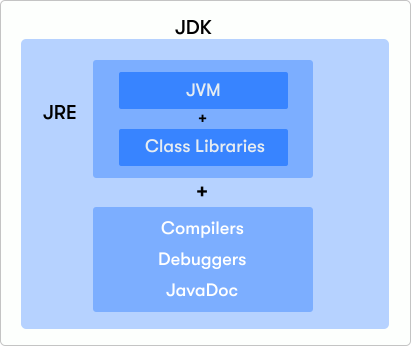
Relationship between JVM, JRE, and JDK
Which of the following contains the compiler (javac)?
Tip 💡:
- If you want to RUN Java programs -> Install JRE.
- If you want to DEVELOP Java programs -> Install JDK.
Key Takeaways
- JVM: The abstract machine that runs bytecode. Platform independent.
- JRE: The runtime environment. JVM + Libraries.
- JDK: The full development kit. JRE + Tools (Compiler, Debugger).
Common Pitfalls
[!WARNING] "javac is not recognized": This error happens if you have JRE installed but not JDK, or if your Path variable is not set to the JDK's
binfolder.
What's Next?
Now that you understand the machinery, let's write your first actual Java program. Write "Hello World" →